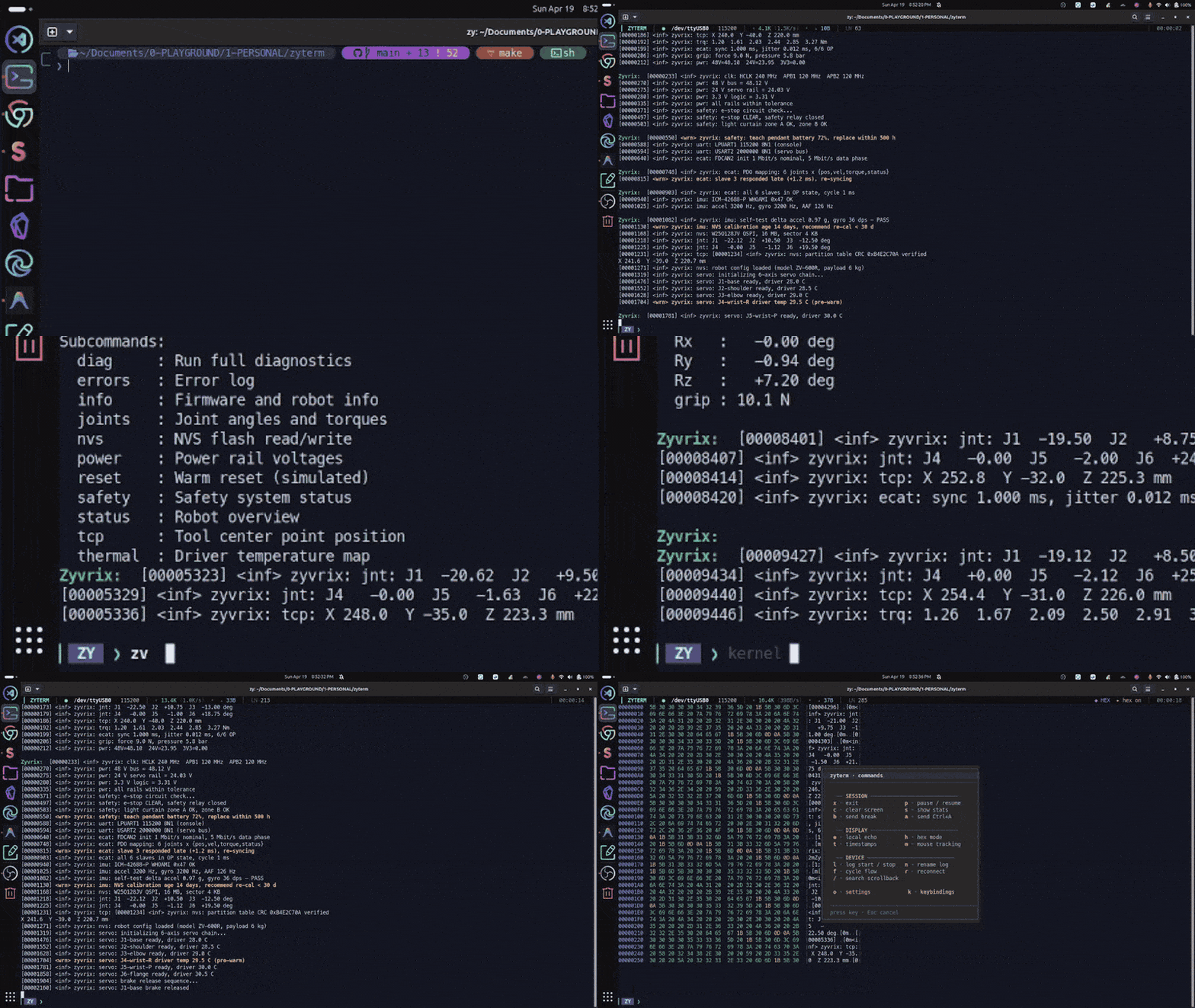
A serial terminal for Linux. One C binary, libc the only runtime dependency, nothing to configure.
Version 1.5.0. 12,510 lines of C. Fifty numbered defects from two source-review audits, all closed.
Install
Install
sudo dpkg -i zyterm_*.deb — amd64 or arm64, from Releases. Or make && sudo make install. A C compiler and make are the whole toolchain.
Connect
zyterm /dev/ttyUSB0 -b 115200. Swap the node for whatever ls /dev/tty* shows.
Quit
Ctrl + A then q.
No Python, no Node, no daemon. Scrollback and search are on by default.
Disconnects
Pull the adapter out mid-boot-log. The lines stay. Scroll, search, copy. Plug it back in and the live tail resumes where you left it.
A ◆ DISCONNECTED pill in the HUD holds the state. The popup hides as soon as you scroll. Reconnect flashes ✓ reconnected.
Cold start behaves the same way. Launch zyterm before the board is plugged in and it waits for the port instead of exiting.
--no-reconnect opts out. --port-glob "/dev/ttyUSB*" or --match-vid-pid 0403:6001 re-resolves the port on every replug, so a board that re-enumerates on a different node still comes back.
Input while the device talks
Most terminals share one screen between output and input, so incoming bytes scroll over the line you are typing.
zyterm splits the screen into three zones with ANSI scroll regions. HUD at the top, output in the middle, prompt and cursor anchored at the bottom.
--threaded adds an optional reader that drains the device into a lock-free SPSC ring, for rates high enough that the main loop falls behind.
Ring overflows are counted, not swallowed. Dropped bytes appear in the HUD and in the Prometheus metrics.
Search
Scrollback search
Ctrl + A then /. n and N step matches. Case-sensitive substring, no regex.
Watch patterns
--watch ERROR --watch panic colours matching lines as the bytes arrive. Literal substrings, matched per line.
Bookmarks and macros
Ctrl + A + drops a bookmark, [ lists them. F1–F12 fire macros.
Scrollback, command history and bookmarks are in memory. They are gone on exit, and no dotfile is written for them.
Connection profiles are on disk. Since 1.5.0 they round-trip the full runtime config: flow control, every --watch pattern, the beep flag, and all twelve F-key macros.
Device output is untrusted
Device colour renders by default. Firmware that prints <wrn> in yellow and <err> in red shows as colour, not as ^[[1;33m caret litter. Shell completion columns line up.
Bytes from the far end of the cable are attacker-controlled input. They can move the cursor, set the window title, or drive an OSC 52 clipboard write. cat > /dev/ttyUSB0 from the other side is enough to do it.
So device output goes through a bounded SGR-only filter. Colour passes. Clipboard, title, cursor, erase and private modes are neutralized to inert caret text.
The parser is a three-state machine. A sequence passes only when every parameter byte is a digit, a semicolon or a colon, and the parameter buffer is fixed-size — it aborts to inert text rather than grow. CSI ? 1 m looks like colour but carries a private marker, so it is rejected.
Standalone C1 bytes (0x80–0x9F) fall under the same rule since 1.5.0. Some terminals treat them as single-byte forms of the escapes being blocked. UTF-8 continuation state is tracked so real text is not mangled.
--no-sgr selects strict deny-all. Ctrl + A then G gives full raw passthrough, for cases like driving KGDB.
The HTTP bridge follows the same posture: loopback bind, Host/Origin validated on the write routes and on /ws and /stream, and --http-token for a bearer gate.
Clipboard
Drag to select anywhere on screen. Release. The bytes land on the system clipboard.
Selections anchor to the data, not the rows. Scroll to check the end of a selection and it doesn't drift.
Architecture
Single-threaded by default. One poll(2) loop, one context struct, no shared state.
Modules include downward only: each layer may include the one beneath it and nothing above. make layering-check enforces this in CI, so a render change cannot reach into the serial layer.
Turning that rule on required moving code, not adding a lint. The render and send paths had back-edges into higher layers; those were inverted through sinks on the context struct. rx_ingest moved down into the loop. The HTTP bridge, one 2,000-line unit, was split into six behind a private header.
Mouse selection maps screen columns to byte offsets, stepping over invisible escapes and multi-byte UTF-8.
/* Visible column to byte offset. The buffer holds raw bytes
 * including ANSI SGR colour codes; the mapping has to step
 * over invisible escape runs to land on a real character. */
size_t col_to_byte(const char *s, size_t len, int col_target) {
    size_t i = 0;
    int    col = 0;
    while (i < len && col < col_target) {
        unsigned char b = (unsigned char)s[i];
        if (b == 0x1b) { i = skip_esc(s, len, i); continue; }
        /* advance by the UTF-8 character width carried in the lead byte */
        size_t step = (b & 0x80) == 0   ? 1
                    : (b & 0xE0) == 0xC0 ? 2
                    : (b & 0xF0) == 0xE0 ? 3
                    : 4;
        if (i + step > len) step = len - i;
        i += step;
        col++;
    }
    return i;
}
The --threaded reader holds a private dup(2) of the serial fd, so a close-and-reopen on the main thread — autobaud, manual reconnect, hot-unplug — cannot race the read. Closing that private copy makes the worker's blocked read return immediately at shutdown.
Audits
Two source-review audits, fifty numbered defects, none open.
Wave one — ZT-001 to ZT-029. The largest finding was the HTTP bridge. POST /tx wrote its body to the serial line with no check on the sender. A text/plain POST is a CORS simple request, so any page open in the operator's browser could push bytes to the board — a reset, a bootloader write — with nothing on screen. DNS rebinding reached it without permissive CORS. Write routes now pin Host and Origin to a loopback literal and return 403 otherwise; --http-token adds a bearer check.
The --detach and --metrics sockets were in /tmp under the inherited umask, reachable by any user on the machine. They moved to $XDG_RUNTIME_DIR, are created 0600, and check the peer uid via SO_PEERCRED.
Wave two — ZT-030 to ZT-050. Twenty-one more, on the already-fixed tree. Three of them were the same mistake: a class fix applied to one path and not to its siblings.
| First fix | Path it missed |
|---|---|
| ZT-001 argv ownership | still live on --profile-save |
| ZT-027 drain before reconnect | gated behind if (!threaded) |
| ZT-007 4 KiB truncation | fixed in the SSE broadcaster, not the JSONL logger |
The rest: POST /tx now waits for a Content-Length body split across TCP segments (413 if oversized, 431 for oversized headers), idle and half-open SSE/WS peers are reaped, /ws sends binary frames so a non-UTF-8 byte no longer drops the socket, connect() is bounded by a timeout, and autobaud requires a printable-score threshold instead of picking the least-bad rate.
Fuzzing. Three libFuzzer targets cover the frame decoders, XMODEM receive, and the HTTP request parser. CI runs each on every pull request.
The XMODEM target found ZT-050 on its first runs: a corrupt block-number complement spun the modal receive loop forever — a hang rather than a crash, which is the class hand-reading misses. It NAKs and reads the retransmission now, with a regression test under a SIGALRM watchdog.
Each defect class is written up as an invariant tied to the bug that produced it, and where possible as a check that runs in CI: make layering-check, the fuzz leg, a thread-sanitizer leg, and a coverage ratchet.
Everything else
| Area | What you get |
|---|---|
| Framing & CRC | raw / COBS / SLIP / HDLC / length-prefixed decoders, with none / CCITT / IBM / CRC-32 checks. Cycle live with Ctrl + A F / K. |
| File transfer | XMODEM (CRC and checksum) and YMODEM send in-tree. YMODEM receive and ZMODEM shell out to lrzsz. |
| Transports | Local serial, tcp://, telnet:// with IAC handling. |
| Logging & replay | text / JSONL / raw with size rotation, asciinema --rec casts, --replay at any speed. |
| Browser bridge | --http serves a live view over HTTP + SSE + WebSocket. --metrics exposes Prometheus text on a UNIX socket. |
| Automation | --on-match /RE/=CMD (POSIX extended regex), --on-connect, --on-disconnect; a send: action injects TX. --filter pipes RX through any command. |
| Sessions | --detach / --attach over a Unix socket. --profile config files with inotify hot-reload. |
| Extras | Hex view, autobaud probe, line-ending translation, a settings dialog (Ctrl + A o), --diff of two captures, and an embedding API (zyterm_embed.a). |
In-app controls sit behind one Ctrl + A menu. Network and automation are launch-time flags. Ctrl + A then ? lists every keybinding.
How it compares
Every cell was checked against that tool's manual page at the version named. Rows zyterm loses come first.
| minicom 2.10 | picocom 3.1 | screen 4.09 | tio 3.9 | zyterm 1.5.0 | |
|---|---|---|---|---|---|
| In your distro's repositories | ✓ | ✓ | ✓ | ✓ | — |
| Terminal emulation (ANSI / VT100) | ✓ | — | ✓ | — | — |
| Case-insensitive scrollback search | ✓ | — | ✓ | — | — |
| A scripting language for automation | ✓ | · | — | ✓ | · |
| Scrollback search, built in | ✓ | — | ✓ | — | ✓ |
| Detach and reattach a session | — | — | ✓ | — | ✓ |
| File transfer without external tools | — | — | — | ✓ | ✓ |
| Reconnects when the device drops | — | — | — | ✓ | ✓ |
| Line timestamps in logs | — | — | — | ✓ | ✓ |
| Live throughput HUD with sparkline | · | — | — | · | ✓ |
Connects out to tcp:// / telnet:// | — | — | — | — | ✓ |
| Framing decoders (COBS / SLIP / HDLC) + CRC | — | — | — | — | ✓ |
| JSONL structured logs | — | — | — | — | ✓ |
| HTTP / SSE / WebSocket browser bridge | — | — | — | — | ✓ |
The close calls:
- Scrollback search.
screenwins it:/and?vi search,n/N, and Emacs incremental search over its history buffer.minicomhassandSfor case-sensitive and case-insensitive search. zyterm's is astrstrinsrc/tui/search.c. - Terminal emulation.
minicomandscreeninterpret ANSI and VT100. zyterm does not, by policy — device escapes are neutralized and only SGR colour is allowed back through a bounded parser. - Scripting.
minicomshipsrunscript, swappable forexpector a shell.tioembeds Lua with a device-search API. zyterm has event hooks and--filter, which is less. - Reconnect.
tiodoes this by default too, with its own device-lookup strategies. - Portability.
tioships macOS builds and a Homebrew formula.picocom's README says it moves to other Unix-like systems with minor changes. zyterm is Linux-only, on purpose: termios2 custom baud, inotify,/sys/class/tty.
Build and CI
One binary, MIT licensed. libc is the only runtime dependency; libxcb is dlopened rather than linked, so it works headless.
Every push builds under gcc and clang, with and without the address and undefined-behaviour sanitizers, and runs the suite on all four. Plus a thread-sanitizer leg for the SPSC ring, the three fuzz targets, cppcheck, a format check, make layering-check, and a coverage gate that fails below its ratchet.
The amd64 and arm64 .deb packages come from the same tree the same way each release. A tag is refused unless it matches ZT_VERSION in the binary.
rfc2217:// is a stub that exits with a pointer to ser2net in raw mode plus tcp://. Multi-pane does not exist — the non-working stub was deleted in 1.5.0. Both are in the repo's STATUS.md.
Design decisions
- Reconnect defaults to on. Bench hardware is unreliable by nature. You reset the board, reflash it, unplug the adapter to move it, and it returns on a different
/dev/ttyUSB*. Exiting on hang-up throws away a session for a routine, self-healing event. - History stays in memory. A serial console is not a shell. Its commands are device-specific byte sequences for one board, and a password typed at a login prompt should not land in a dotfile. Profiles earn a file; scratch history does not.
- Dead code is deleted, not parked. An epoll-and-splice reader and a multi-pane stub sat unwired for months. Both were removed in 1.5.0, along with an OSC 8 settings toggle that flipped a flag nothing read — it had been reporting On and Off for a feature with no implementation. Git keeps them if the ideas come back.
Get it
Get zyterm
amd64 + arm64 .deb for Ubuntu / Debian
Source
github.com/iskandarputra/zyterm
Getting started
Your first session, flags, and shortcuts
sudo dpkg -i zyterm_*.deb
zyterm /dev/ttyUSB0 -b 115200